
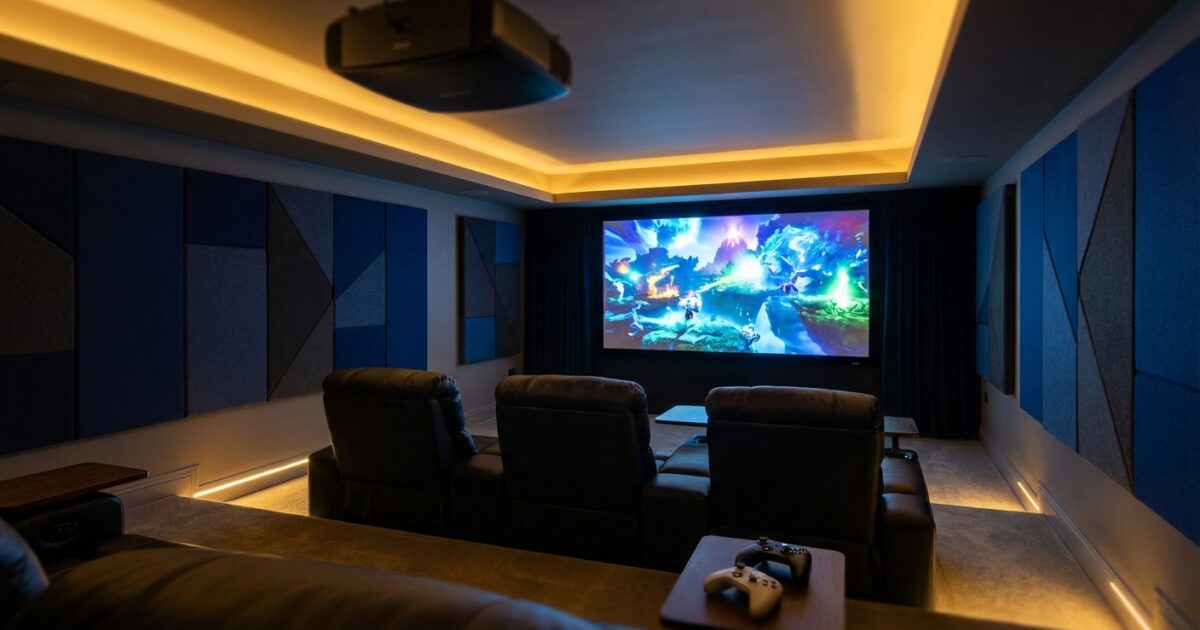
Setting up a gaming projector in your home theater transforms your entertainment space into an immersive gaming arena that rivals commercial venues. Whether you’re working with a dedicated media room or converting your basement into a gaming sanctuary, the right projector setup creates an experience that simply can’t be matched by traditional TVs.
The key to success lies in understanding how gaming projectors differ from standard home theater models and making informed decisions about your specific space and gaming needs.
Essential Gaming Projector Specifications
Gaming projectors require different performance characteristics than traditional movie projectors. Input lag stands as the most critical specification — this measures the delay between your controller input and the image appearing on screen. For competitive gaming, you’ll want input lag under 30 milliseconds, with the best gaming projectors achieving 16-20ms in their dedicated gaming modes.
Response time affects motion clarity during fast-paced action sequences. Look for projectors with response times under 16ms to minimize motion blur during racing games, first-person shooters, and sports titles.
Resolution determines image sharpness and detail. While 1080p projectors remain viable for budget setups, 4K models provide the detail modern games deserve. True 4K projectors display native 3840×2160 resolution, while pixel-shifting models use lower-resolution panels with optical tricks to approximate 4K detail.
Brightness measured in lumens affects image quality in various lighting conditions. Gaming projectors need sufficient brightness to maintain vibrant colors and contrast even with some ambient light. Aim for at least 2,000 lumens for dedicated theater rooms with controlled lighting, or 3,000+ lumens if your space has windows or regular ambient lighting.
Projector Recommendations by Budget Range
Budget-Conscious Options ($1,500-$3,000)
Entry-level gaming projectors in this range offer solid performance without premium features. These models typically provide 1080p or pixel-shifted 4K resolution with acceptable input lag for casual gaming. You’ll find reliable options from established manufacturers that deliver good color accuracy and sufficient brightness for darkened rooms.
Mid-Range Performance ($3,000-$6,000)
This sweet spot category delivers true 4K resolution, excellent input lag performance, and gaming-specific features like variable refresh rate support. These projectors often include dedicated gaming modes that optimize all settings for responsive gameplay while maintaining good image quality.
Premium Gaming Projectors ($6,000-$10,000+)
High-end gaming projectors combine cutting-edge specifications with premium build quality. Expect native 4K resolution, laser light sources for consistent brightness and color, advanced HDR support, and input lag measurements that rival the best gaming monitors. These models often feature multiple HDMI 2.1 ports supporting 4K at 120Hz.
Room Setup and Optimization
Your room’s dimensions determine optimal projector placement and screen size. Throw distance — the space between projector and screen — varies significantly between models. Short-throw projectors work well in smaller rooms, positioning just feet from the screen, while standard throw projectors require 10-20 feet of distance.
Calculate your ideal screen size using the projector’s throw ratio specifications. For gaming, screen sizes between 100-120 inches provide immersive experiences without causing eye strain or forcing you to move your head constantly to track action across the display.
Ceiling height affects projector mounting options and viewing angles. Rooms with 8-foot ceilings work well with ceiling mounts, while higher ceilings may require adjustable mounts or shelf placement to achieve proper screen alignment.
Lighting control becomes crucial for gaming projector performance. Install blackout curtains or blinds to eliminate natural light during gaming sessions. Consider dimmable LED lighting with warm color temperatures that won’t compete with your projector’s output or cause screen reflections.
Installation Considerations
Ceiling mounting provides the cleanest installation and optimal projector positioning. Professional-grade ceiling mounts offer fine adjustment capabilities for perfect screen alignment. Ensure your ceiling can support the projector’s weight plus the mount, and plan cable routing to avoid visible wires.
Shelf placement works well for rooms where ceiling mounting isn’t practical. Dedicated projector shelves or media furniture can position the projector at the correct height and distance. This approach makes projector access easier for maintenance and filter changes.
Cable management significantly impacts your installation’s appearance and functionality. Run HDMI cables through walls or use cable conduits to connect gaming consoles positioned near seating areas to projectors mounted across the room. Consider HDMI signal boosters for runs longer than 25 feet.
Gaming-Specific Features
Variable Refresh Rate (VRR) technology synchronizes your projector’s refresh rate with your gaming console’s output, eliminating screen tearing and stuttering. Look for projectors supporting AMD FreeSync or G-Sync compatibility for smooth gameplay across varying frame rates.
Low latency modes sacrifice some image processing for reduced input lag. Modern gaming projectors automatically detect gaming content and switch to optimized modes, but manual controls let you fine-tune the balance between image quality and responsiveness.
HDR gaming support enhances visual impact in compatible games through improved contrast and color range. HDR10 support is standard, while premium projectors may include Dolby Vision or HDR10+ for even better image quality.
Multiple HDMI inputs with 4K/120Hz support accommodate multiple gaming consoles and high-refresh-rate gaming PCs. HDMI 2.1 ports provide the bandwidth necessary for next-generation gaming features.
Dual-Purpose Optimization
Balancing gaming performance with movie watching requires strategic compromises. Gaming modes prioritize response time and input lag, while cinema modes emphasize color accuracy and image processing. Quality projectors offer multiple picture presets, letting you switch between optimized settings instantly.
Consider automated lighting control systems that adjust room ambiance based on content type. Smart home integration can dim lights automatically when gaming sessions begin or create custom scenes for different entertainment activities.
Audio considerations become important in dual-purpose setups. While gaming often benefits from directional audio cues, movies favor enveloping surround sound. Plan your speaker layout and receiver settings to accommodate both preferences.
Budget Planning and Professional Installation
Beyond the projector cost, budget for essential accessories including a quality projection screen, ceiling mount, and professional-grade cables. Screens designed for gaming offer faster response times and better reflection characteristics than basic models.
Professional installation makes sense for complex setups involving ceiling mounting, in-wall cable runs, and integration with existing home automation systems. Experienced installers ensure proper projector alignment, optimize picture settings, and handle any electrical work safely.
DIY installation works well for simpler setups using shelf mounting and surface-mounted cables. Modern projectors include setup wizards and automatic calibration features that simplify the configuration process.
Common Setup Mistakes to Avoid
Undersizing your room’s electrical capacity can cause problems when adding high-powered projectors and gaming equipment. Verify your electrical panel can handle additional load and consider dedicated circuits for sensitive equipment.
Ignoring ambient light control results in washed-out images and poor gaming visibility. Even small amounts of light reflection can significantly impact projector performance.
Skipping screen selection and projecting directly onto walls creates hotspots, uneven brightness, and poor image quality. Dedicated projection screens dramatically improve image uniformity and color accuracy.
Poor cable management not only looks unprofessional but can cause signal issues and safety hazards. Plan cable routing during installation rather than as an afterthought.
Setting up your gaming projector correctly transforms your home theater into an entertainment destination that provides years of immersive gaming experiences. Take time to research your specific needs, plan your installation carefully, and don’t hesitate to consult professionals for complex setups. The investment in proper planning and quality equipment pays dividends in gaming performance and overall enjoyment of your dedicated entertainment space.